PRTG

PRTG SNMP Error -2003: how to troubleshoot "No Response" without guessing

8 min readUpdated Sep 23, 2026

Asked by the community

MN

marco_netops

Network Engineer · asked Sep 21, 2026

PRTG just started throwing SNMP error -2003 on one of our core switches. The sensor is red and marked Down, but I can ping the device all day long and it is clearly up and passing production traffic.

The twist: I moved this device onto a new remote probe last week. Ping works fine from the new probe, but every SNMP sensor on it times out with -2003. Our firewall team swears nothing changed on their side. Am I chasing a firewall ghost, or is it something more specific? I do not want to just start flipping settings and hope.

PRTGSNMPerror -200312 replies
Solution from Gotelemetry

PRTG SNMP error -2003 means the probe never received the expected SNMP response. It is not automatically a firewall problem. Here is the exact, Probe-first order to isolate the real cause: reachability, UDP 161, SNMP version, credentials, allowed-manager ACLs and the specific OID.

core-sw-01SNMP TrafficDOWNSNMP error -2003 · No Response

What -2003 actually means: the probe did not receive the expected SNMP response. Paessler treats it as a no-response / timeout condition that can be caused by SNMP configuration, credentials, routing, ACLs or the target device itself. It does not automatically mean "firewall problem."

The reason -2003 feels random is that people troubleshoot it out of order. If you always work from the monitoring perspective inward, the cause falls out in minutes instead of an afternoon of guessing.

Start from the Probe, not your laptop

The most important question is: which Probe owns the failing sensor? PRTG SNMP monitoring originates from that Probe, so every test has to be performed from that same machine. Testing from your workstation proves nothing, because it takes a different path with different firewall rules and a different source IP.

A good first check is Paessler SNMP Tester on the Probe machine. Paessler specifically recommends a simple Read Device Uptime request to verify whether basic SNMP communication works at all. If uptime succeeds, the device is reachable over SNMP from that machine and you can stop blaming the network.
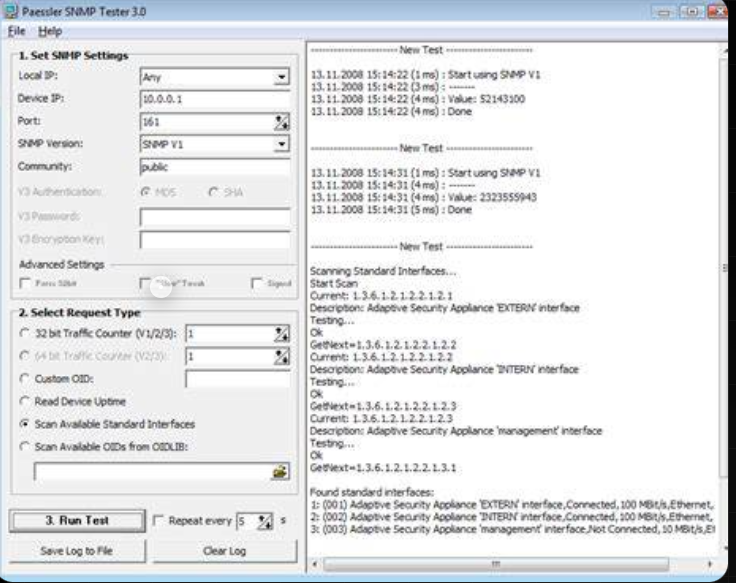
Paessler SNMP Tester 3.0 configured with device IP 10.0.0.1, port 161 and community public, running a test that returns values in the log pane
Paessler SNMP Tester on the Probe: set the device IP, port 161 and community, then Run Test with Read Device Uptime.

Troubleshoot in this exact order

SNMP sensor fails

  1. 1Which Probe owns it?
  2. 2Does Ping / basic reachability work?
  3. 3Does SNMP work against another device?
  4. 4Does SNMP Tester work from this Probe?
  5. 5Does a simple uptime query work?
  6. 6Check UDP 161
  7. 7Check SNMP version
  8. 8Check community / SNMPv3 credentials
  9. 9Check allowed-manager ACL
  10. 10Check specific OID / interface index
  11. 11Check GETBULK / Multi-GET compatibility

PRTG's current SNMP documentation polls over UDP 161 and recommends confirming that SNMP traffic can pass bidirectionally between the monitoring system and the target. Bidirectional matters: the request going out is not enough, the response has to come back to the same Probe.

Ping working does not prove SNMP works

This is the single most common mistake. Ping and SNMP are different protocols taking different paths through different rules. One can succeed while the other is silently dropped.

Ping
ProbeICMPDevice
Reaches the device
SNMP
ProbeUDP 161Device
Silently dropped

Ping only proves ICMP connectivity. SNMP can still fail because of:

  • Wrong community string or SNMPv3 credentials
  • UDP 161 filtering
  • SNMP agent disabled on the device
  • An allowed-manager ACL that excludes the Probe
  • Wrong SNMP version
  • Target-side SNMP issues

Paessler notes that community strings are case-sensitive, and that some devices only accept SNMP requests from explicitly approved monitoring hosts. Both look exactly like -2003.

Turn the order into decisions

Run these checks top to bottom from the Probe that owns the sensor. Each answer sends you to exactly one next move, so you never change two things at once.

Live triage

  1. 1Can the Probe ping the device?
    YesReachability is fine, move to SNMPNoFix routing, L2 or device power first
  2. 2Does SNMP Tester read Device Uptime from the Probe?
    YesSNMP transport works, jump to the sensor / OIDNoStay on transport: port, version, credentials
  3. 3Is UDP 161 open in both directions?
    YesMove on to the SNMP versionNoOpen UDP 161 for request and response
  4. 4Do the community string or v3 credentials match exactly?
    YesCheck the allowed-manager ACLNoFix credentials, they are case-sensitive
  5. 5Is the Probe source IP in the device allowed-manager list?
    YesCheck the specific OID / interface indexNoAdd the new Probe IP to the ACL

If SNMP Tester works but the PRTG sensor fails

That is actually good news. It proves basic SNMP communication is working, so stop troubleshooting connectivity. Your focus should move to what is specific about the failing sensor:

  • The specific OID being queried
  • The interface index
  • Sensor configuration
  • Inherited credentials from the parent device or group
  • GETBULK compatibility
  • Multi-GET compatibility
  • Vendor-specific SNMP behavior

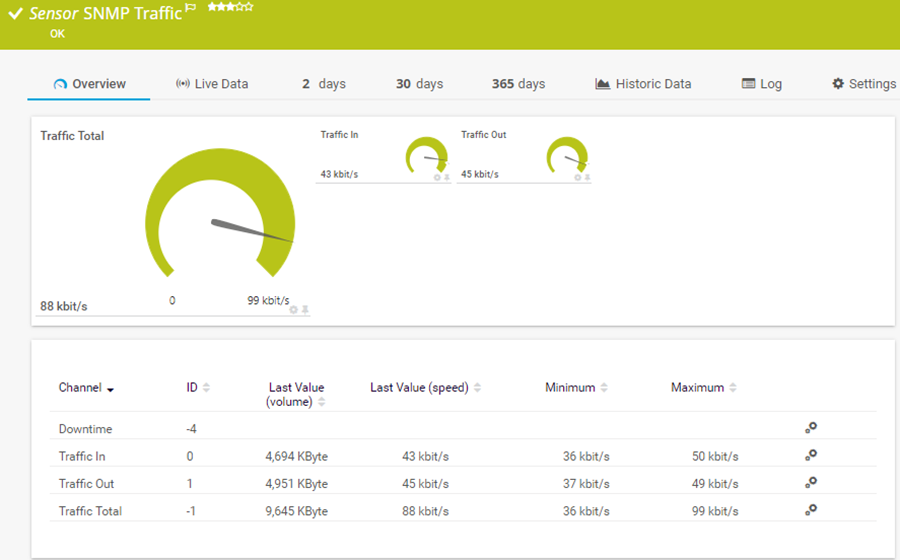
For example, System Uptime may work while SNMP Traffic fails. At that point stop looking at basic connectivity and start looking at the specific interface table or OID being queried.
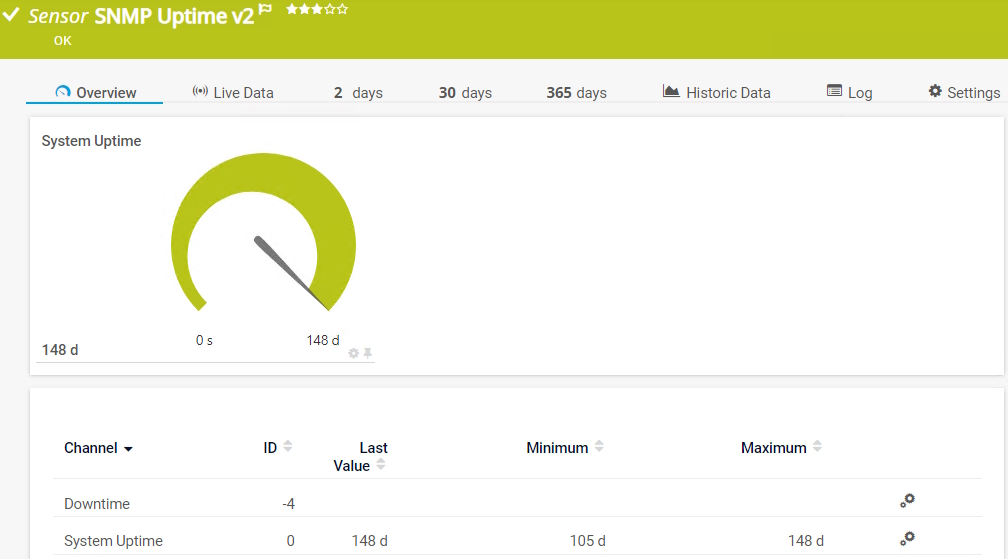
PRTG SNMP Uptime v2 sensor in OK state showing 148 days system uptime
System Uptime answers cleanly: basic SNMP to the device is fine.
PRTG SNMP Traffic sensor showing traffic in and out channels
If SNMP Traffic fails while Uptime works, the problem is the interface OID, not the connection.

Watch for Probe migrations

A common enterprise version of -2003 appears right after moving monitoring from one Probe to another. The new Probe has a new source IP, and target ACLs do not know about it yet.

Old Probe IP   10.20.1.15   (allowed on the router)
New Probe IP   10.20.1.16   (NOT in the allowed-manager list)

Ping  10.20.1.16 -> device   works   (ICMP is open)
SNMP  10.20.1.16 -> device   -2003   (source IP rejected)

So after any Probe migration, always ask: has the SNMP source IP changed, and does the target still allow it? That one question resolves a large share of post-migration -2003 tickets, including the one in the thread above.

core-sw-01SNMP TrafficOKProbe IP allowed · responding on UDP 161

The key rule: first prove basic SNMP from the exact Probe that owns the sensor, then move from connectivity to credentials to target configuration to the OID and sensor-specific behavior. Order beats guessing every time.

Frequently asked questions

What does SNMP error -2003 mean in PRTG?
It means the PRTG probe did not receive the expected SNMP response within the timeout. Paessler classifies it as a no-response condition that can be caused by SNMP configuration, credentials, routing, allowed-manager ACLs or the target device itself. It does not automatically mean a firewall problem.
Does a successful ping prove that SNMP is working?
No. Ping only tests ICMP connectivity. SNMP uses UDP 161 with its own credentials and ACLs, so a device can answer ping while SNMP is silently dropped. Always confirm SNMP itself from the probe using Paessler SNMP Tester.
Why does SNMP error -2003 appear after moving a PRTG probe?
A new probe has a new source IP. If the target device restricts SNMP to an allowed-manager list, the new probe IP is rejected while ping still works. Add the new probe source IP to the device SNMP ACL.
How do I test SNMP from a PRTG probe?
Run Paessler SNMP Tester on the probe machine itself. Set the device IP, UDP port 161 and the community or SNMPv3 credentials, then run a simple Read Device Uptime request. If uptime returns a value, basic SNMP works from that probe.
What port does PRTG use for SNMP?
PRTG polls SNMP over UDP 161. It must pass bidirectionally: the request going out to the device and the response coming back to the same probe.
SNMP Tester works but the PRTG sensor still fails. Why?
That proves SNMP transport is fine, so stop debugging connectivity. Focus on what is specific to the failing sensor: the exact OID or interface index, inherited credentials from the parent device or group, and GETBULK or Multi-GET compatibility.

Did this solution help?

Let us know if this got you to a fix.

SNMPError -2003No ResponseUDP 161ProbeACL
More PRTG articles

Ready to make reliability your advantage?

Book a consultation and we will map your fastest path to unified, resilient observability.